Hinge pin vanishes in Render and Material preview modes

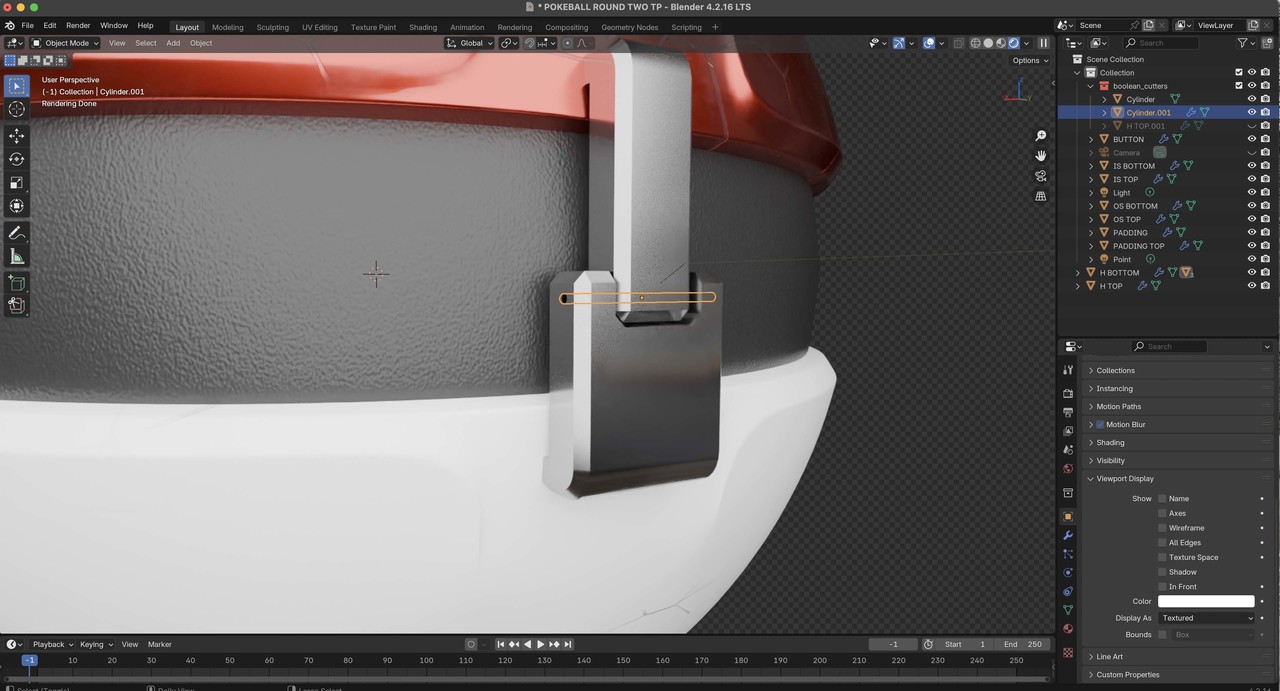
The pin for the hinge is visible in solid and Xray mode but not in Render and Material Preview modes. Not sure how this happened but figured I ask to see if anyone else had this issue.

1 love
Reply
  • thehomme replied

    post screenshots! Sounds like a material issue

    1 love
  • Martin Bergwerf replied

    Hi Sean WWashedUpMedia

    Don't forget to include your Outliner in the screeenshot!

    1 love
  • Dwayne Savage(dillenbata3) replied

    Make sure object has rendered turned on. Look at camera icon in outline. Also make sure the alpha is set to 1 on the principle shader. 

    1 love
  • Omar Domenech replied

    It's not a common error no. Seems like you have a setting enabled somewhere and we have to fish for it. More likely is the render icon in the Outliner is disabled. We'll see when you post the screenshots and give us more context. 

    1 love
  • Sean Ageman(WashedUpMedia) replied

    My apologies for not including this originally 2.14.03 PM copy.jpg

    1 love
  • Omar Domenech replied

    I can't really tell by the screenshot, but is it long enough that it pokes out the metal piece? Also turn on the filter in the Outliner to see if the camera render icon is enabled. Also check for flipped normals, it may be inverted. 

    1 love
  • Sean Ageman(WashedUpMedia) replied

    Turns out it was a ray visibility issue, Camera was checked off...thanks everyone for jumping in!

    • 👌
    • 👍
    1 love