
Hi, can you show an image of the complete leather material node setup?


Hi Luciano LLucianoBSQ ,
Like Omar says, look in the Course Files > blends > luminor_camera_materials.blend. That's easier than a screenshot of the Node Tree. But here it is:
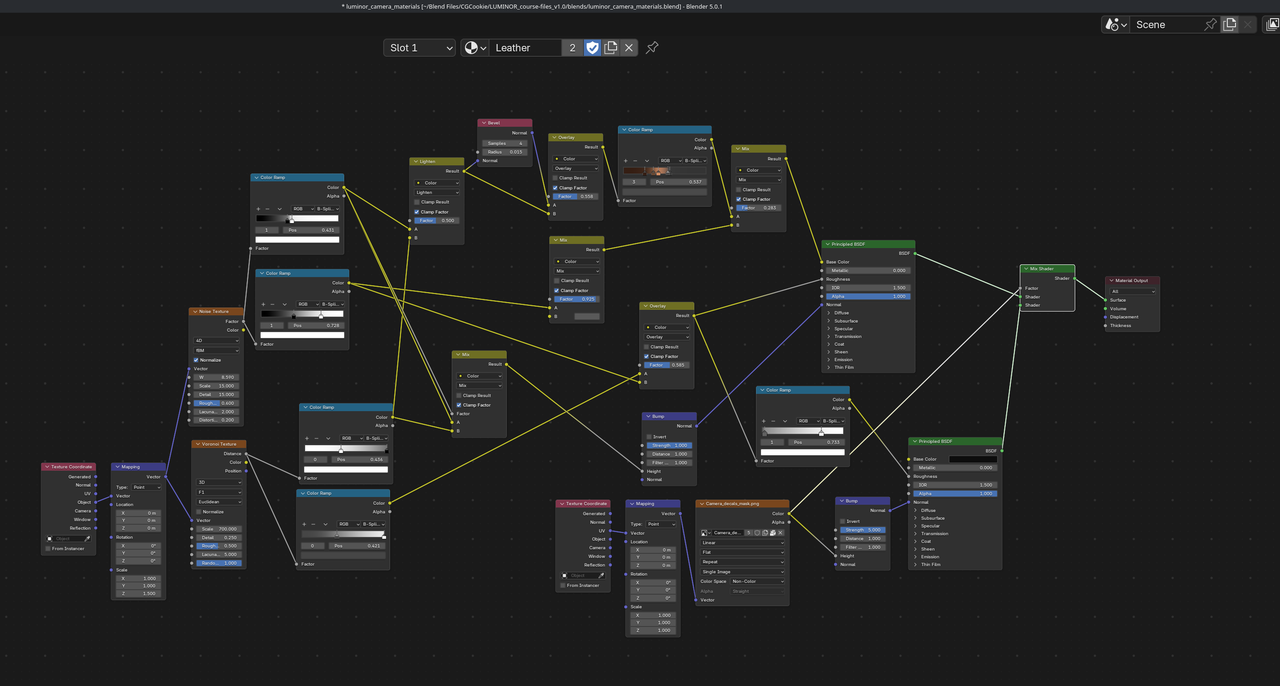

It is difficult to follow the video of the node setup esp if you’re a beginner. You never see enough context of the graph and it’s also in such a small window. It’s hard to know which mix mode you’re connecting as the graph builds esp as the results are very subtle it’s tricky to know if you’ve connected the right node cos the visual result isnt clear. I thought it would have been very beneficial to organise the nodes at the end of each lesson so the exact structure could be shown and reviewed.