
I'm a beginner currently working through the core fundamentals modeling course. Trying to practice different modifiers Jonathan talked about in the hard surface modeling section. I was trying to use simple deform to bend a cylinder into a "U" shape. I added loop cuts in edit mode and then I seemed to be able to use deform on the cylinder to get the shape I was trying for. But, now it looks like this in edit mode (see below).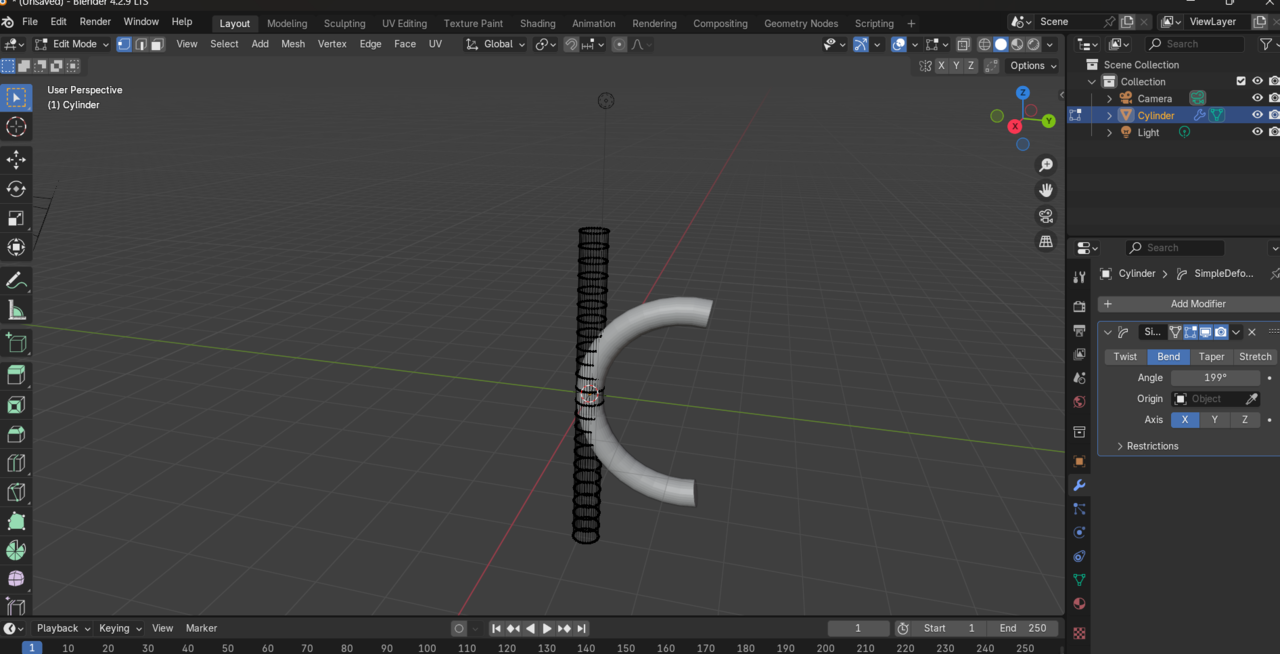 I don't know how to describe it exactly, but it's like all the geometry of the mesh is separate from the object? I feel like I'm missing something very obvious. Any help is appreciated so I can better understand what's happening here for the future! Thanks in advance from a very new beginner!

Hi Vanessa
Don't worry, it's all working correctly. What you're seeing there is, similar to say a subdivision modifier, that the modifier isn't actually deforming the geometry, it's just simulating it. If you were to apply the modifier in object mode now, the geo would follow the shape.
If you want to see the geo following the deformation without applying the modifier, you can toggle on the "on cage" option in the modifier, which is currently grey.
You could also toggle off the modifier in edit mode (next button over) and you'll see that the shape will not appear deformed until you go back to object mode.
It's just various ways to work with modifiers and display them however needed in any given situation. :)

Cool thing is, you can leave the cage off, so you see the mesh in a quantum mechanics super position of both states at the same time, and in edit mode you start to move stuff around and see the final result change on the fly. So you can leave it on or off, it's all good.
Thank you both very much! I went back and toggled the cage "on" and it worked just as described. Appreciate the help!